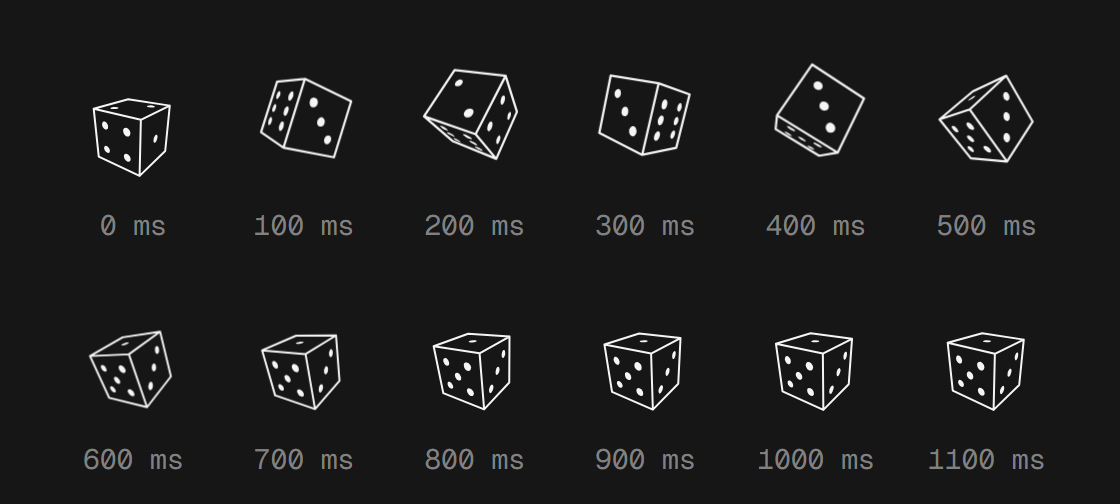
Most of the motion on this site is over before you can really look at it. The die tumbles for 1.1 seconds. The arrow that points at it is done in 2.26, and the name on the home page arrives in under one. So I made the Lab: every piece on a timing sheet, where you can replay it, slow it down to a tenth, or step through it a frame at a time.
None of it is a recording. A recording would only ever show one throw, and the real die lands on a different face every time you replay it, the same way the scenes grow from whatever you type. So the Lab runs the same code as the rest of the site, and this post is about how that code stops at whatever millisecond you ask for.
One clock
Every piece in the Lab has a clock, and the clock is just a number: how many milliseconds into the piece you are. useTimeline holds it. Playing adds the time since the last frame, times the speed. A step moves it by one frame at 60fps, about 16.7 milliseconds. Dragging the sheet sets it directly.
let last = performance.now();
let frame = requestAnimationFrame(function tick(at) {
  now.current = Math.min(duration, now.current + (at - last) * speed);
  last = at;
  setTime(now.current);
  if (now.current < duration) frame = requestAnimationFrame(tick);
  else setPlaying(false);
});
Nothing in there knows about dice or arrows. The clock moves, and each piece draws itself at whatever time the clock shows. So every piece has to answer the same question: what do you look like at 412 milliseconds?
The motion on this site is made in four different ways, and each one answers it differently:
| Piece | On the site | In the Lab |
|---|---|---|
| Die tumble | requestAnimationFrame calls angleAt |
angleAt with the sheet’s time |
| Die hop | element.animate() |
The same animation, paused, currentTime set |
| Arrow, text reveal | CSS keyframes | getAnimations(), paused, currentTime set |
| Melt | Its own requestAnimationFrame loop |
draw(progress), called by hand |
A function of time
The die was the easy one. A throw is four numbers, the angle it starts at and the angle it lands at on each axis, and angleAt says where it is a given number of milliseconds in:
export const settle = (t: number) => (t >= 1 ? 1 : 1 - 2 ** (-10 * t));

export function angleAt([x0, y0, x1, y1]: Throw, ms: number): [number, number] {
  const k = settle(ms / TUMBLE_MS);
  return [x0 + (x1 - x0) * k, y0 + (y1 - y0) * k];
}
Then drawDie(x, y) turns the cube to that angle and projects it into two SVG paths, one for the edges and one for the pips. Neither function remembers anything between frames. On a post, the die calls them on every frame with the time since you pressed it. In the Lab, a copy of the die component calls them with whatever the sheet says. Same functions, a different clock.
That also means any frame is one function call away, so the Lab can show more than one at a time. When you pause in the middle of a throw, it draws the die again 2, 4, 6 and 8 frames back, as fading outlines. Pause this one halfway and step through it:
The hop is different. It isn’t math in a loop, it’s keyframes: up and a little larger, a small landing, then still, played with element.animate(). The Lab creates that same animation once per throw, pauses it straight away and sets its currentTime to the sheet’s time:
if (lift.current?.turn !== turn) {
  lift.current?.animation.cancel();
  const animation = el.animate(HOP, { duration: HOP_MS, fill: "both" });
  animation.pause();
  lift.current = { turn, animation };
}
lift.current.animation.currentTime = Math.min(t, HOP_MS);
A paused animation with its time set by hand is the whole trick for the next part, too.
Holding CSS still
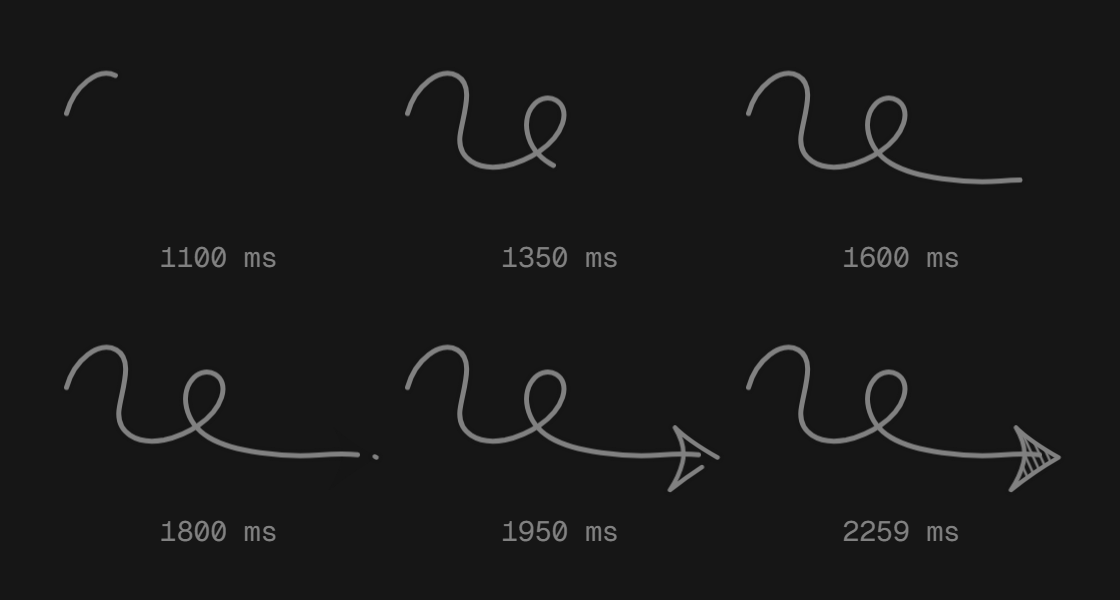
The arrow and the text reveal don’t have any JavaScript. They’re keyframes in globals.css, and the components only put the right classes on the right elements. The Lab uses them as they are.
That works because the browser already treats every CSS animation as an Animation object, the same kind element.animate() returns. getAnimations({ subtree: true }) lists every one under an element, so useSeekCss pauses them all and gives them the sheet’s time:
for (const animation of host.current?.getAnimations({ subtree: true }) ?? []) {
  const end = Number(animation.effect?.getComputedTiming().endTime ?? 0);
  animation.pause();
  animation.currentTime = Math.min(t, end - 1);
}
Each word of the text reveal is its own animation, with its own animation-delay. The delay counts as part of the animation’s time, so giving all of them the same currentTime keeps the stagger: at 100 milliseconds the first word is 100 in, the second is 50 in, and the third hasn’t started yet.
The end - 1 is there on purpose. Moving an animation to its end makes it fire animationend, even while it’s paused. On a post, that’s the event the arrow uses to say it’s done, and it’s when the die shows up in the corner and the browser remembers you’ve seen the hint. So the Lab never lets an animation get there. It stops one millisecond short, and as far as the page knows, nothing ever finished.
To replay, the Lab gives the piece a new key. React mounts fresh elements, their animations start over, and the same loop pauses them before anything is painted. Here’s the arrow held at six of those times:
And here’s the text reveal, a bar for each word:
A shader you can stop
The melt was the one I had to change. On a post, rolling the die lays a WebGL canvas over the art for 1.1 seconds and melts the old scene into the new one. It used to be one function: set up WebGL, then run its own requestAnimationFrame loop from start to end. Nothing outside it could hold it at 40%.
So I split it in two. meltLayer sets up the canvas, the shader and both textures, and returns draw(progress), which renders the melt at any point from 0 to 1. melt is now just the loop that calls it, for the cover. The Lab calls draw itself:
layer.current ??= meltLayer(host, from.current, live, seed, still);
layer.current?.draw(ease(t / MELT_MS));
The old scene it melts from is a copy. Before a new seed takes over, the Lab copies the frame on screen into a plain canvas, so a replay can melt from the same picture as many times as you want, long after that scene is gone. But only the melt is on the clock. The scene underneath keeps drawing at its own 15 frames a second, like it does on a post.
Type a number or a word, or let the die pick one:
Drawing the sheet
Each row on a sheet is a track: a label, when it starts, when it ends, and its curve, the value it goes through from 0 to 1. The bar draws the curve as a thin line, lights up the part that already played, and clips a brighter copy of the line up to the playhead.
For the die and the melt, the sheet reads its numbers from the same code that plays them: HOP_MS, TUMBLE_MS, settle, MELT_MS, ease. The CSS pieces are the exception. Their timings live in globals.css, so the sheet has them written down by hand. It’s the one place the Lab copies the site instead of running it.
Copying a CSS curve still means drawing it. cubic-bezier() doesn’t give you y for an x directly: both come from a third value that runs along the curve. But x only ever goes up, so halving the range finds it, and 24 halvings land closer than any bar could show:
export function bezier(x1: number, y1: number, x2: number, y2: number) {
  const at = (a: number, b: number, k: number) =>
    ((1 - 3 * b + 3 * a) * k + (3 * b - 6 * a)) * k * k + 3 * a * k;
  return (x: number) => {
    let lo = 0;
    let hi = 1;
    for (let i = 0; i < 24; i++) {
      const mid = (lo + hi) / 2;
      if (at(x1, x2, mid) < x) lo = mid;
      else hi = mid;
    }
    return at(y1, y2, (lo + hi) / 2);
  };
}
The hop’s curve is put together from its keyframes the same way: up to the top at 36%, a small dip under the line at 80%, then flat.
The rest of it
- It plays once on its own. Each piece performs the first time it’s 60% in view, and never if your system asks for reduced motion.
- Play always has something to play. Pressing play on a piece that never ran starts a fresh run, instead of playing back nothing.
- Typing settles first. The seed field waits 400 milliseconds after your last key, so typing 4096 quickly gives you one melt, not four.
- The keyboard can do all of it. The bars are one slider: the arrows step a frame, Page Up and Page Down step ten, Home and End jump to either end, and Space plays or pauses. A screen reader hears the time and the frame, like “412 ms, frame 25 of 66”.
Building the Lab barely touched the rest of the site. The die’s geometry moved into its own file so the Lab could import it, the arrow moved out of the cover into its own component, and the melt got split in two. None of them behave any differently on a post.